

Meet Combine AI: The Clinic Operations Partner That Doesn’t Clock Out
Know what is happening in your clinic. Decide what needs attention. Prepare tomorrow—without waiting for the front office to come back online.
Aalim Rattansi
September 28, 2026
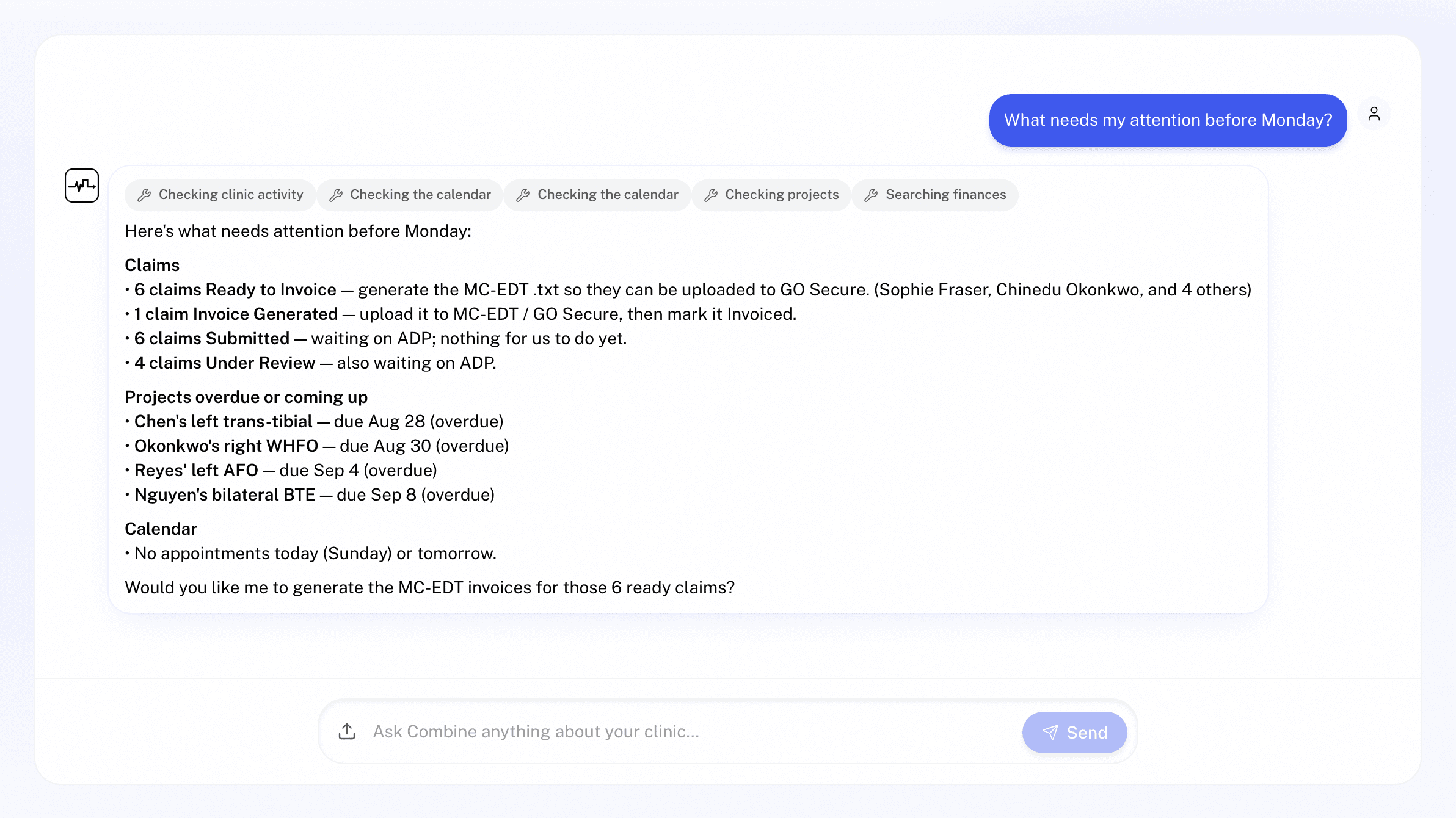
You should not have to text your team on Sunday night to understand what Monday looks like.
But that is often what happens when the owner of a clinic is also a clinician. You finish the day with questions that live somewhere inside the practice: Which claims are ready? Did that patient receive a reminder? Where is the AFO project? Does Sam have room for an assessment on Tuesday? What still needs attention before the week begins?
The answers exist. They are just spread across schedules, patient files, notes, claims, projects, invoices, and staff memory.
Combine AI brings those answers into one conversation.
Combine AI is the AI assistant built into Medfair, the clinic management software for orthotics, prosthetics, hearing and mobility clinics. The simplest way to think about it is as a clinic operations partner: one that knows how to look through your clinic’s records, can prepare the next step, and is available whenever you have a question. You do not need to know which screen contains the answer or which sequence of filters will find it. Ask the way you would ask a capable colleague.
A clear view of your clinic, on your time
Most clinic software waits for you to navigate it. Combine starts with the question you actually have.
Ask, “What’s active in the clinic right now?” and Combine can summarize claim counts by status, recent claims, patient totals, what Ontario’s Assistive Devices Program (ADP) has paid, and the patient portions on claims that are still open.
Then go deeper:
- “Which claims are ready to invoice?”
- “Show rejected mobility claims since June.”
- “Who is booked tomorrow?”
- “Any no-shows this week?”
- “Which orthotics projects are still in progress?”
- “Has Jane paid her payment request?”
- “Was John’s appointment reminder sent?”
Combine answers from the clinic’s own Medfair records. Results link back to the relevant patient, claim, note, appointment, or project, so a quick answer can become a proper review when it needs to.
For a clinician-owner, that means administrative visibility without becoming an expert in the administrative interface. For a multi-clinic owner, it creates a repeatable check-in: ask the same operating questions inside each clinic’s workspace and compare what needs attention before speaking with the teams.
Turn an after-hours check-in into tomorrow’s plan
Visibility matters because it changes how you plan.
Imagine opening Medfair for 15 minutes after dinner. You ask Combine for a clinic snapshot, then check tomorrow’s schedule. You see a gap in the afternoon and ask when the clinician is free for a casting. You check which projects are in progress and whether any patient portions remain unpaid. Finally, you verify that tomorrow’s reminders went out.
In one conversation, you have moved from “I wonder how the clinic is doing” to a short, specific plan:
- Follow up on two rejected claims.
- Offer an open slot to a patient waiting for a fitting.
- Check one project that is approaching its due date.
- Send the missing reminder after reviewing it.
That is the real value of Combine after hours. It does not merely produce another dashboard. It lets you follow your own train of thought—from clinic-level questions to the patient, claim, appointment, or project behind them.
It can prepare the work, not just describe it
Traditional reporting tools stop at the answer. Generic AI tools can suggest what to do next, but they do not know your clinic’s live schedule, records, or workflows.
Combine is different because it sits inside the system where the work happens.
When the next step is supported, Combine opens the same Medfair form or confirmation card your team would use, already filled with what it found. You can review the details, make changes, and approve the action.
That includes work such as:
- booking, rescheduling, or cancelling an appointment;
- sending or re-sending appointment confirmations and reminders;
- drafting a one-off patient email;
- creating a device project with an owner and due date;
- preparing an ADP invoice batch for download;
- opening a payment request for a claim’s patient portion, or for a charge no claim covers;
- sending a card deposit link; and
- recording a deposit already received, when the user has owner or Front Office access.
Nothing is saved, sent, generated, or cancelled until a person confirms it. Combine can do the legwork without taking judgment away from the clinic.
That distinction matters. A useful AI assistant for a clinic should reduce the distance between a question and an informed action. It should not make consequential decisions on your behalf.
One question can cross the boundaries your job already crosses
Clinic owners rarely think in software modules. A question about tomorrow may touch the calendar, a patient’s appointment history, an email reminder, and a project deadline. A question about cash may begin with an ADP claim and end with the patient portion.
Combine works the same way your role does. It can move from a clinic snapshot to a claim, from a patient to their recent appointments, or from a project to the person responsible for it. It searches claims by patient, device description, ADP code, category, status, and service date. It can search staff notes and chart notes for a phrase, then show who wrote the relevant note and when.
This is especially useful when you are not the person who handled the original task. You do not need to reconstruct the front office’s clicks. You can begin with the language you already have: a patient’s name, a device, a day, a claim number, or simply, “What is going on with this patient?”
When more than one record matches, Combine asks which one you mean. When nothing matches, it says so. It is designed to clarify rather than guess.
Patient privacy and control stay visible
An always-available operations partner is only useful if the clinic stays in control.
Combine reads only the records in the clinic workspace you are using. It does not answer general-knowledge questions, provide medical advice, or interpret ADP policy. Patient-file and note access is logged under the team member who asked. Information such as health card numbers, birth dates, and addresses is not pulled from records for an ordinary AI response; Combine uses age instead of date of birth, shortens long notes, and limits clinic-wide note searches to the lines around a match.
Your own message is sent as you type it, so Combine also pauses when a message appears to contain an Ontario health number and gives you a chance to edit it.
The operating model is simple: Combine can find, summarize, and prepare. A person decides.
Your clinic should still be knowable when the day ends
The front office remains essential. Combine is not a replacement for the people who know the patients, manage exceptions, and keep the clinic moving.
It is a way to make that work more visible and accessible to the owners responsible for the whole picture. That is the standard in our Ethics Statement on AI: AI should reduce the barriers between people and meaningful work, not replace the people doing it.
For the clinician who wants to understand the business after the final appointment, Combine provides a direct line into clinic operations. For the multi-clinic owner, it creates a consistent language for checking each location. For both, it means fewer late-night messages, fewer unanswered questions, and a better-prepared start to the next day.
Start with one question:
“What’s active in the clinic right now?”
Then keep asking. Combine will show you what it knows, take you to the source, and prepare the next step when you are ready.
Combine AI is included in Medfair Pro and Health System, and in the 30-day Pro trial. Current terms are on the pricing page, and the features page shows how Combine fits with the rest of Medfair.
Frequently asked questions about Combine AI
What is Combine AI?
Combine AI is the AI assistant built into Medfair, the clinic management software for orthotics, prosthetics, hearing and mobility clinics. You ask about your clinic in plain language, and it answers from your clinic’s own records: claims, appointments, patient files, notes, projects and payments.
Can Combine AI act without approval?
No. When the next step is supported, such as booking an appointment, sending a reminder or opening a payment request, Combine opens the same Medfair form or confirmation card your team would use, already filled in. Nothing is saved, sent, generated or cancelled until a person confirms it.
Does Combine AI replace front office staff?
No. Combine makes the front office’s work easier to see for the owners responsible for the whole clinic. The people who know the patients and manage the exceptions stay in charge.
How does Combine AI protect patient privacy?
Combine reads only the records in the clinic workspace you are using, and patient-file and note access is logged under the team member who asked. Health card numbers, birth dates and addresses are not pulled into ordinary AI responses, and Combine pauses before sending a message that appears to contain an Ontario health number.
Can Combine AI give medical advice or interpret ADP policy?
No. Combine answers only from your clinic’s Medfair records. It does not answer general-knowledge questions, give medical advice, or interpret ADP policy.
Which Medfair plans include Combine AI?
Combine AI is included in Medfair Pro and Health System, and in the 30-day Pro trial. Current terms are on the pricing page.