

Digital Patient Intake Forms for Ontario ADP Clinics
What to put on the form, how it should feed scheduling and your ADP applications, and how to move off paper without a backlog.
Aalim Rattansi
November 9, 2026
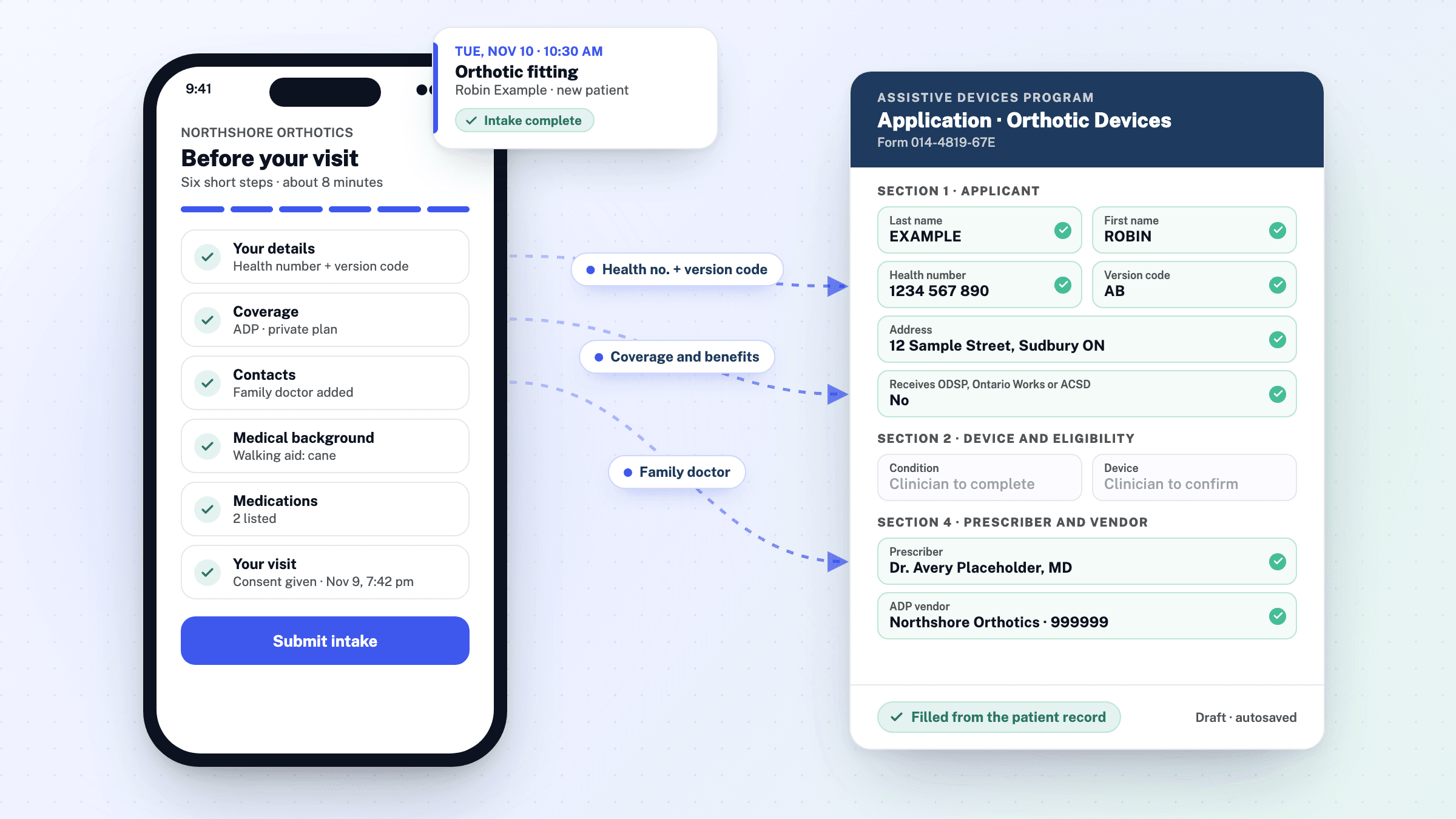
Digital patient intake forms replace your paper clipboard with an online form that captures demographics, consent and device history once, then feeds scheduling and your ADP paperwork directly. For a single-location Ontario clinic filing ADP claims, the goal is simple: the patient record becomes claim-ready, and nothing gets entered twice.
Key takeaways
- A digital intake form needs four sections: demographics, device-specific health history, ADP-relevant functional details, and PHIPA-compliant consent.
- Design the intake form against the ADP application, not the front desk's habits, so the patient record alone is enough to assemble a claim.
- Connected intake and scheduling removes re-keying, cuts health card number typos, and replaces the claims spreadsheet with live claim status.
- Transition by digitizing one form first, migrating only patients with appointments in the next 60 to 90 days, and running paper in parallel for two weeks.
- Ask any vendor where your data is stored, how it is encrypted and how you get your records back if you leave, and put its obligations in writing. Keeping intake data in Canada keeps the privacy questions simple.
What should a digital patient intake form include?
A digital intake form for an orthotics, prosthetics or mobility clinic needs four sections: demographics, health history relevant to your device category, ADP-relevant functional details, and consent. Anything else is optional. The goal is a patient record that is complete enough to start an ADP application without a follow-up call.
Demographics and contact details
Name, date of birth, address, phone, email, and the health card number with its version code. ADP funds Ontario residents with a valid Ontario health card, and the application asks for both the number and the version code, so capture them here rather than chasing them later.
Health history relevant to your device category
Keep this short and device-specific. A mobility clinic needs diagnosis, weight-bearing status, transfer ability and wheelchair use history, because ADP ties mobility funding to functional need, not diagnosis alone. A hearing clinic needs different fields. Build one form per device category.
Consent and communication preferences
Collect PHIPA-compliant consent to collect, use and disclose health information, plus the patient's preferred contact method. Digital forms timestamp consent automatically, which paper cannot do.
How do online patient intake forms connect to medical clinic scheduling software?
What breaks when intake and scheduling are separate
When intake lives on paper and scheduling lives in a shared calendar, the front desk re-enters the same patient details two or three times, and each pass is a chance for a typo in a health card number or an ADP application field. A missed intake form means a clinician walks into a fitting without the equipment details or consent signatures they need. Your claims spreadsheet then becomes the only place tracking which ADP claims are still outstanding, because nothing upstream feeds it.
What a connected workflow looks like
In one system, a booked appointment triggers the intake form, and the patient's answers reach their file before the visit. In Medfair, every online booking comes with a pre-visit intake link sent by email, and staff can send one when they book an appointment themselves. The answers land on the patient file for your team to review and accept, and the health card number and version code carry straight into the ADP application. From there, Medfair carries the record through fabrication, invoicing and payment, so nothing is entered twice. The owner sees claim status without maintaining a separate tracker.
How can intake forms capture ADP eligibility criteria and Assistive Devices Program information?
Fields that map to ADP eligibility criteria
An intake form should collect the fields an ADP application depends on: the Ontario health card number and version code, diagnosis and date of diagnosis, the device category being requested, and the family doctor or other prescriber. The application also asks whether the patient receives Ontario Works, ODSP or Assistance for Children with Severe Disabilities, and whether WSIB or Veterans Affairs Canada should pay instead, so ask about coverage at intake.
For mobility applications, the authorizer completes Section 2: the patient's presenting medical condition, their basic functional mobility status, any mobility equipment ADP has funded before, and eligibility statements such as whether the patient needs the device to move around their home or beyond it. Walker and wheelchair prescriptions also ask for the patient's weight. Intake can collect the raw material for all of it: current walking aids, falls, how far the patient can walk, and where they need to get to.
Building the assistive devices program mobility application form from intake data
If your intake form captures those fields once, the ADP application stops being a rewrite. The patient record becomes the source: demographics, diagnosis and functional assessment flow into the application, and the front desk no longer rebuilds ADP applications by hand for every device.
The test for claim-ready intake is simple: could someone who has never met the patient assemble the ADP application from the record alone? If the answer is yes, your form captured the right fields. If the answer is no, every application will be rebuilt by hand, every device will need a second round of phone calls to fill gaps, and the claims spreadsheet will keep growing because nobody can tell which applications are waiting on what. Design the intake form against the application, not against the front desk's habits, and the whole claim lifecycle starts from a complete record instead of a partial one.
Funder portion vs patient portion at intake
Capture payment responsibility at intake, not at invoicing: who pays the funder portion, whether the patient contributes, and any third-party coverage. Say plainly in your consent language that you will share the patient's information with ADP and any other funder. The IPC's guidance on consent under PHIPA explains when consent can be implied and when it must be express. Role-based access to that record matters too, as covered in staff permissions for patient health teams.
What is the difference between paper and digital patient intake forms?
The difference shows up in four places: how long intake takes, how often errors happen, how safely records travel, and how much work remains before an ADP application can be filed.
| Paper | Digital | |
|---|---|---|
| Intake time | Patient writes by hand at the front desk; staff re-check it | Patient completes it online before the appointment; staff review on arrival |
| Errors | Illegible handwriting, missing fields, re-keying into other systems | Required fields, validation, and one entry carried through |
| Privacy | Paper folders, shared calendars, unlocked filing cabinets | Access controls, an audit trail, and storage in Canada if your vendor offers it |
| Claim preparation | ADP applications rebuilt by hand for every device; a spreadsheet tracks outstanding claims | One record carries into the application, fabrication, invoicing and payment |
The claim row is where the gap is widest. With paper, the same patient details are copied onto each device's application, and claim status lives in a spreadsheet nobody trusts. A digital record entered once removes both jobs. The honest caveat: digital only pays off if the record actually flows through scheduling, fitting and billing. Tools that stop at intake leave you re-keying anyway, which is why we built Medfair around the full claim lifecycle rather than forms alone, as described in our notes on pairing software with a clinic operations partner.
How do clinics like Billings Clinic and Christie Clinic handle online scheduling and intake?
Large US systems such as Billings Clinic and Christie Clinic have moved the front desk online. Billings Clinic lets patients schedule appointments online. Christie Clinic patients book through its MyChart portal and can eCheck-in before they arrive, so the front desk starts with the visit already set up instead of a clipboard. The pattern worth borrowing is not their scale but their sequence: schedule first, collect intake against that appointment, and have the record ready when the patient walks in.
A small Ontario ADP clinic can run the same sequence with tools sized to it. The difference is that your intake also has to feed an ADP application, a fabrication order and an invoice, which is the gap Medfair closes for clinics like yours. If any data crosses the border, read the Office of the Privacy Commissioner of Canada's guidelines for processing personal data across borders first.
What privacy and consent language should patient intake forms contain in Ontario?
PHIPA consent basics
Ontario clinics are health information custodians under PHIPA. A federal exemption order takes custodians out of PIPEDA for the collection, use and disclosure of personal information within Ontario, so PHIPA is the law that governs your intake form. Information that leaves the province falls outside that exemption.
Your intake form should state what information you collect, what you use it for (care, ADP applications, invoicing), and who may see it, including ADP and any other funder that pays part of a claim. Ask for express consent to collect and disclose, and add a separate line for secondary purposes like reminders. Include a note on retention and on how a patient can request access or correction.
Data residency and vendor questions to ask
If you move intake to software, the vendor supplies electronic services to you as a custodian. PHIPA's regulation limits what such a provider may do with your patients' information (O. Reg. 329/04, s. 6), and it requires a written agreement when the vendor is a health information network provider. Even when it isn't strictly required, get the arrangement in writing. Ask where data is stored, whether it stays in Canada, how it is encrypted and backed up, and how you would retrieve records if you leave. Medfair keeps clinic records in Canada, and the same questions apply to any vendor you evaluate.
How do you transition patients from paper forms to digital intake?
Step 1: Pick one form and digitize it
Start with the intake form you photocopy most often, not your whole archive. Rebuild it as a template with fixed fields for ADP-relevant details: health card, device category, funder portion versus patient portion, consent language. One form, done properly, teaches your team the workflow before you digitize everything else.
Step 2: Migrate active patients
Don't backfill years of charts. Digitize only patients with appointments in the next 60 to 90 days, and have them complete the new form at their next visit or beforehand. Larger systems prove patients will self-serve: Billings Clinic lets patients schedule appointments online. Send the link by email or text, and have your front desk follow up only with the patients who don't complete it.
Step 3: Retire the paper workflow
Set a cutoff date. After it, new patients only get the digital form, and paper becomes the exception you handle manually. Keep your spreadsheet for claims in flight until those ADP applications close, then move outstanding claim tracking into the same system. Run paper and digital in parallel for two weeks, not two months.
Which software options fit a small Ontario ADP clinic?
Medfair is built for one job: turning the patient record into claim-ready ADP paperwork, then carrying it through fabrication, invoicing and payment, with nothing entered twice. It is organized around the roles in your clinic (owner, Front Office, Clinicians and Technicians) and replaces the paper forms and the claims spreadsheet. Basic is $0 and covers ADP applications entered by hand. Pro is $125 a month with five seats and adds application autofill, scheduling with online booking, invoicing and fabrication projects.
Where it falls short: Basic and Pro cover a single location, so a multi-site group needs the custom Health System plan. In-app ADP applications cover orthotic, limb prosthesis, respiratory and pressure modification devices today, not mobility or hearing. And Medfair does not try to be a general-purpose clinic system beyond scheduling, intake and the ADP claim lifecycle.
Juvonno, TherapyAlly, Jane App and ClinicSense are broader practice management tools. They handle scheduling, charting and billing for allied-health clinics generally, but none of them advertises support for ADP applications, so expect to fill each application by hand and to track claim status in a spreadsheet you maintain yourself.
Spreadsheets plus paper forms cost nothing and stay familiar, but every ADP application is retyped and outstanding claims are tracked by hand. If ADP paperwork is your bottleneck, Medfair fits; if you need broader features first, start with the generalists.
Frequently asked questions about digital patient intake forms
Do I still need to mail the ADP mobility application form if my intake is digital?
No. Since January 1, 2022, ADP has accepted applications only through eSubmission and returns applications sent by mail, courier or fax. The vendor fills the government form, exports it as an XML file and uploads it through GO Secure and MC EDT. Digital intake doesn't change that channel. What it changes is the preparation: because your intake captured the health card, diagnosis, device category and functional details once, the application is assembled from the patient record instead of retyped by hand for every device.
Can patients fill out intake forms at home before their fitting appointment?
Yes, and that is the point. A booked appointment triggers the form, the patient completes it online, and their answers reach the patient file before they arrive. Larger systems like Billings Clinic and Christie Clinic already move scheduling and check-in online. Your front desk then only follows up with patients who did not complete it.
How much does it cost to switch a small clinic to digital patient intake forms?
The software can start at $0: Medfair's Basic plan covers ADP applications entered by hand, and Pro, at $125 a month with five seats, adds scheduling, online booking and application autofill. The real cost is staff time during the transition, which you can contain by digitizing one form first, migrating only patients with appointments in the next 60 to 90 days, and running paper and digital in parallel for two weeks.
Are digital intake forms PHIPA compliant if the vendor stores data outside Canada?
Not automatically. PHIPA doesn't ban storage outside Canada outright, but you remain answerable for how your vendor handles your patients' information, and the federal exemption that keeps PIPEDA out of your intake covers only what happens within Ontario. A vendor that stores data in Canada keeps this simple. Ask directly where data is stored, whether it stays in Canada, and how it is encrypted and retrieved if you leave. Medfair keeps records in Canada; apply the same questions to any vendor you evaluate.
What should I do with completed paper intake forms from existing patients?
Do not backfill years of charts. Digitize only patients with appointments in the next 60 to 90 days, and have them complete the new form at their next visit. Keep paper records for closed files according to your retention policy, and keep your claims spreadsheet only until in-flight ADP applications close.
Sources
- Assistive Devices Program, Government of Ontario
- eSubmission: moving from fax-based to online-only applications, ADP memorandum, August 5, 2021
- Technical specification for electronic submissions, Assistive Devices Program
- Consent and your personal health information, Information and Privacy Commissioner of Ontario
- O. Reg. 329/04: General, under the Personal Health Information Protection Act, 2004
- Health Information Custodians in the Province of Ontario Exemption Order (SOR/2005-399)
- Guidelines for processing personal data across borders, Office of the Privacy Commissioner of Canada
- Request an appointment, Billings Clinic
- MyChristie patient portal and eCheck-in, Christie Clinic